ReportSense
Help Center

Frequently Asked Questions

Everything about uploading reports, understanding your results, managing your plan, and keeping your health data private. Tap a topic to jump straight to it.

Getting Started

15

What is ReportSense?

ReportSense turns your lab report PDF into a plain-language explanation in about two minutes. You see what each value means, what needs attention, and what to ask your doctor, in 8 Indian languages and built for Indian patients. It is for education only, not medical advice.
How do I sign up?

Go to reportsense.in and tap the "Sign In" button in the top right. You can sign up in seconds with your Google account, with no password to create or remember, and your free account is ready straight away. If you would like to use referrals later, you can verify your phone number from inside the app, but it is not needed just to get started.

What type of lab reports does ReportSense support?

ReportSense works with blood test reports, including CBC (complete blood count), lipid profile, thyroid (TSH, T3, T4), liver and kidney function, blood sugar and HbA1c, vitamins such as D and B12, and many more. You simply upload the report PDF your lab gave you. It reads numeric pathology reports, so imaging reports such as X-ray, ultrasound, or MRI are not supported yet.

Which labs does ReportSense work with?

ReportSense works with reports from any Indian lab that gives you a PDF. It is tuned for the major labs, including Healthians, Apollo Diagnostics, SRL Diagnostics, Thyrocare, Metropolis, Dr Lal PathLabs, Redcliffe Labs, Tata 1mg Labs, Agilus Diagnostics, Max Lab, Pathkind and Vijaya Diagnostic. If your lab is not on the list, do not worry, your report will most likely still work.

How can I upload my report?

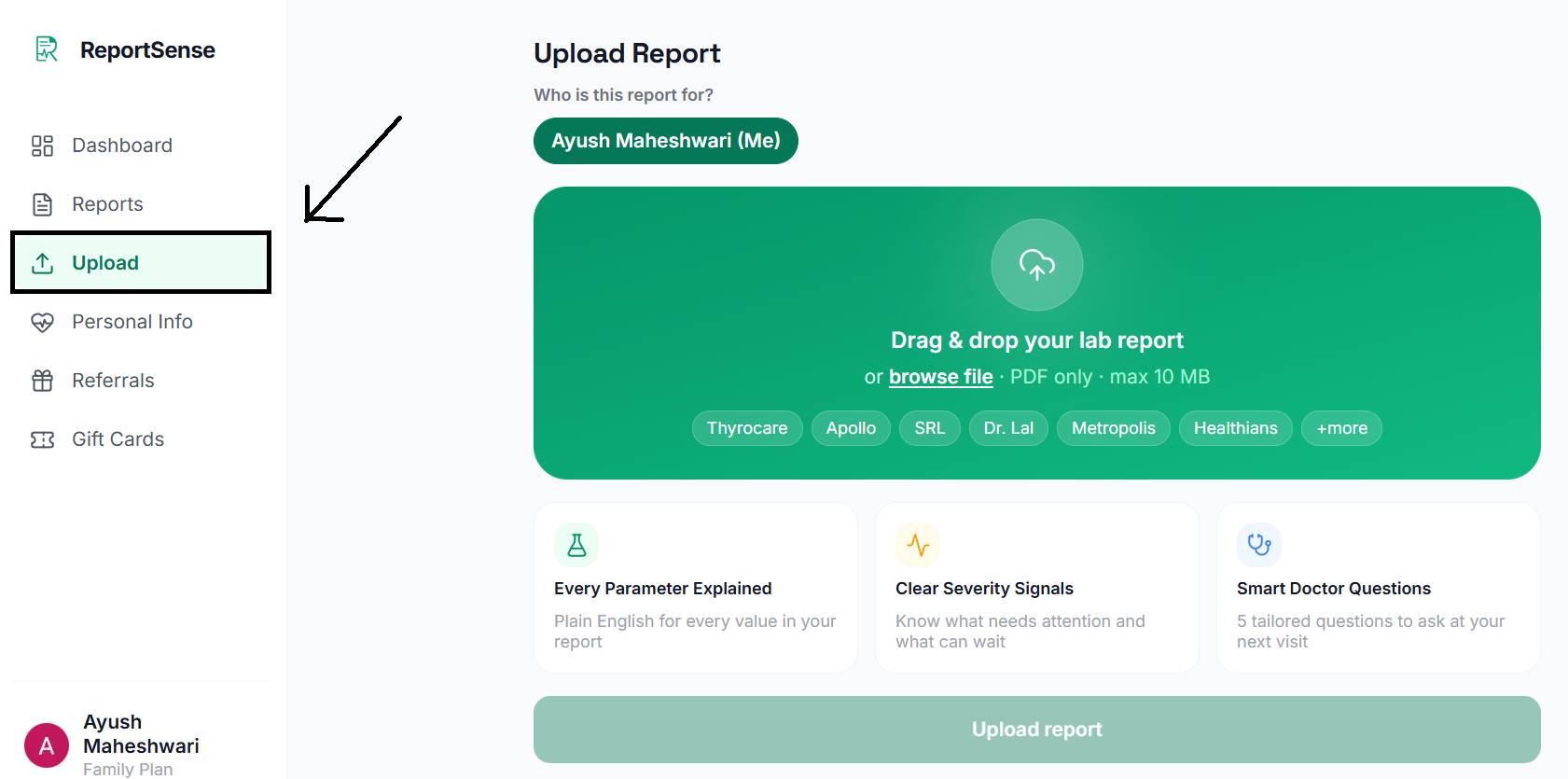
After signing in, open Upload from the menu on the left (on a mobile browser, tap the green + button in the centre of the bottom bar). Choose which family member the report is for, select the PDF, and analysis starts automatically. Tip: fill in your Personal Info first, because the more we know about you, the more personalised and accurate your explanations are.

Uploading a lab report PDF in ReportSense, with a profile picker and file selector

From where can I access my reports?

All your reports live in the Reports section. On a computer it is in the left-hand menu; on a mobile browser it is in the bottom bar, just left of the + button. Your latest reports also appear on your Dashboard. Tap any report to open its full explanation, insights, and doctor questions, on any device.

Is ReportSense available as a mobile app?

Not yet. ReportSense is a web app, so it works in any browser on your phone, tablet, or computer. Just open reportsense.in on your phone and use it like any app, with nothing to install. A dedicated Android and iOS app is on our roadmap.

What file format and size is accepted?

ReportSense accepts PDF files up to 10 MB in size. Almost every lab report PDF is comfortably within this limit. For the most accurate reading, upload the original PDF your lab emailed or gave you rather than a photo or screenshot of it.

How long does the analysis take?

Most reports are ready in under two minutes. You will see a live progress bar showing each step, from reading your report to analysing your parameters, and the results open automatically the moment they are ready. You are free to leave the page and come back, as your report keeps processing in the background.

Which languages are supported?

ReportSense explains your reports in 8 languages: English, Hindi, Tamil, Telugu, Kannada, Marathi, Bengali, and Gujarati. You choose the language you are most comfortable with, and your explanations are written in that language.

How do I change the language for my reports?

Open Settings and pick your preferred language from the list of 8. Every new report you upload after that is explained in your chosen language, and you can change it any time.

Does changing language affect my existing reports?

No. Changing your language setting applies to the reports you analyse afterwards. Reports that were already processed stay in the language they were first created in, so nothing you have already read will change.

Can I use ReportSense for commercial purposes, or is it personal only?

Not at the moment. ReportSense today is for your own personal and family use. We are soon launching a separate product for businesses such as hospitals, clinics, and labs, so if you are interested in commercial or B2B use, please write to us at support@reportsense.in and we will share the details.

What new features is ReportSense bringing?

Yes, we have plenty on the way. Some of the features we are building include cross-report analysis, trend and pattern tracking across your reports over time, and a daily health tracker, with more to come. Keep an eye on this page and our updates as they roll out.

How do I contact ReportSense for support?

You can reach our support team any time by email at support@reportsense.in. Whether you have a question about your report, your subscription, a referral, or your privacy, we are happy to help, and we aim to respond as quickly as we can.

support@reportsense.in

Understanding Your Results

6

What do "Needs Attention", "Borderline", and "Normal" mean?

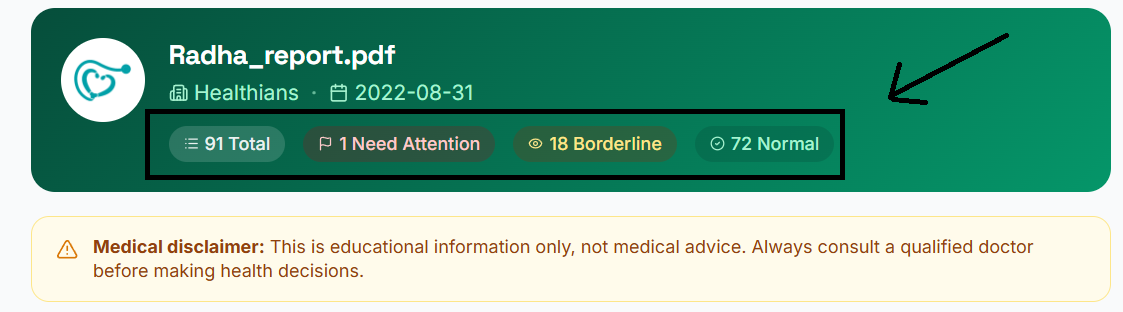
These are simple severity signals for each parameter, based on its reference range. "Normal" (green) means the value sits comfortably within the healthy range. "Borderline" (amber) means it is close to the edge and worth keeping an eye on. "Needs Attention" (red) means the value is outside the normal range and is worth discussing with your doctor. Each one comes with a plain-language explanation and a High or Low marker, so you understand exactly what it means.

A ReportSense report showing Needs Attention, Borderline and Normal severity badges

What are cross-parameter insights?

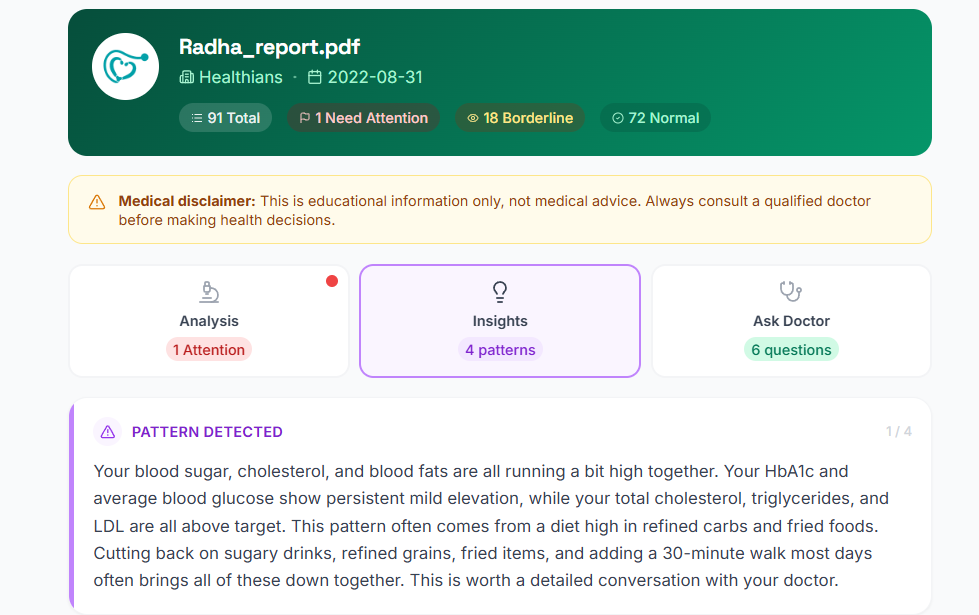
Cross-parameter insights are patterns ReportSense spots by looking at several of your results together, not just one at a time. A few related values might point to a common theme that a single number would not reveal on its own. You will find these under the Insights tab of any report, written in plain language, so you get the bigger picture and not just isolated numbers.

The Insights tab in ReportSense showing cross-parameter patterns

What are the "Ask Your Doctor" questions?

These are a short, ready-made list of questions based on your specific results, found under the "Ask Doctor" tab. They are designed to help you have a more useful conversation at your next appointment, so you walk in prepared and make the most of your time with the doctor. You can read them on screen or note them down to carry along.

How accurate is the AI analysis?

ReportSense reads the values directly from your report and checks each one against reference ranges that account for age and biological sex. We take accuracy seriously and add an extra safety check that flags any value that may have been misread, asking you to confirm it against your original report. ReportSense is an educational tool, so always confirm anything important with your original report and your doctor.

Is ReportSense a substitute for a doctor?

No, and it is not meant to be. ReportSense helps you understand what the numbers on your report mean in plain language, so you feel less in the dark and more prepared. It gives educational information only, not medical advice, and it does not diagnose conditions or suggest treatment. Always consult a qualified doctor to interpret your results and decide on next steps.

Why are some parameters missing from my report?

ReportSense shows the parameters it can confidently read and match from your PDF. A parameter might not appear if it was written in an unusual format, or if it has no standard reference range to compare against. Readings without a reference range are still shown separately under "Other readings", so nothing is hidden, it is just grouped honestly based on what can be assessed.

Personal Info & Family Profiles

9

Why do you ask for my date of birth and gender?

Reference ranges for many lab parameters differ by age and biological sex, and a value that is perfectly normal for one person can be outside the range for another. By knowing your date of birth and biological sex, ReportSense compares each result against the right reference range for you, so your explanations are as accurate as possible. This information is used only for that purpose.

Why should I fill in my health information?

The more ReportSense knows about you, the more personal and relevant your explanations become. Details such as existing conditions, medications, lifestyle, and diet help tailor the analysis to your situation rather than giving generic information. It is completely optional, and you can fill in as much or as little as you like, but a fuller profile gives you more useful results.

What is the personalisation score?

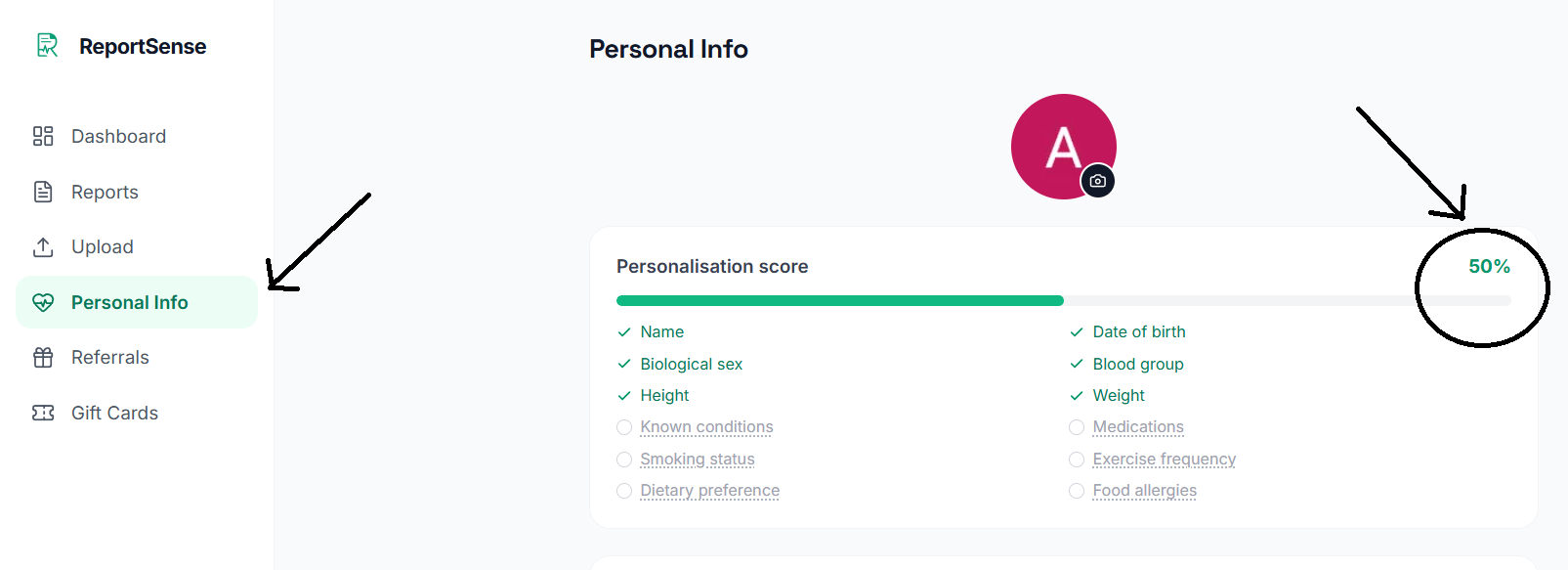
The personalisation score is a simple percentage showing how complete your health profile is, out of 12 details such as name, date of birth, biological sex, blood group, height, weight, known conditions, medications, smoking status, exercise, dietary preference, and food allergies. The higher your score, the more tailored your report explanations can be. Tap any item on the score card to jump straight to that field and fill it in.

The personalisation score on the ReportSense Personal Info screen

What health conditions and lifestyle details can I add?

You can add known conditions such as diabetes, hypertension, thyroid disorder, heart disease, kidney disease, and liver disease, plus any others in your own words. You can also record current medications, smoking status, alcohol consumption, exercise level, your dietary preference (for example vegetarian or non-vegetarian), and any food allergies. All of it is optional and helps make your explanations more relevant to you.

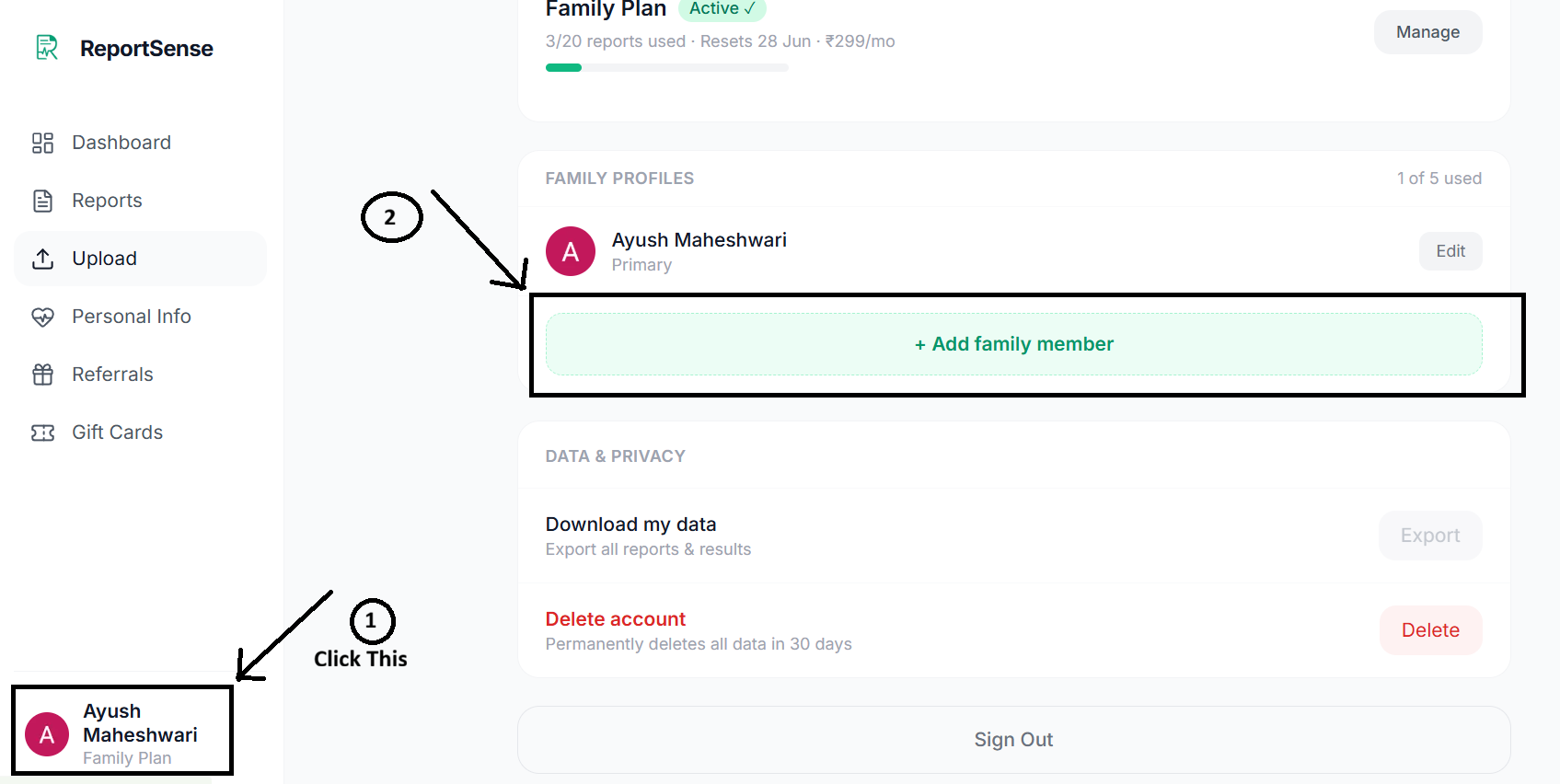
How do I add a family member?

From the app you can create a separate profile for each family member, each with their own name, date of birth, and biological sex. Reports you upload for that person are kept under their profile, so everyone's health records stay neatly separated. The number of profiles you can add depends on your plan.

Adding a family member profile in ReportSense

How many profiles can I have?

It depends on your plan. The Free and Personal plans include 1 profile, which is just for you. The Family plan supports up to 5 profiles, so you can manage reports for yourself and your loved ones, all from one account.

Can I delete a family member's profile?

Yes. You can remove a family member's profile from the app whenever you like. Please note that deleting a profile also removes the reports stored under it, so do this only when you are sure you no longer need that person's records.

Where can I verify my phone number?

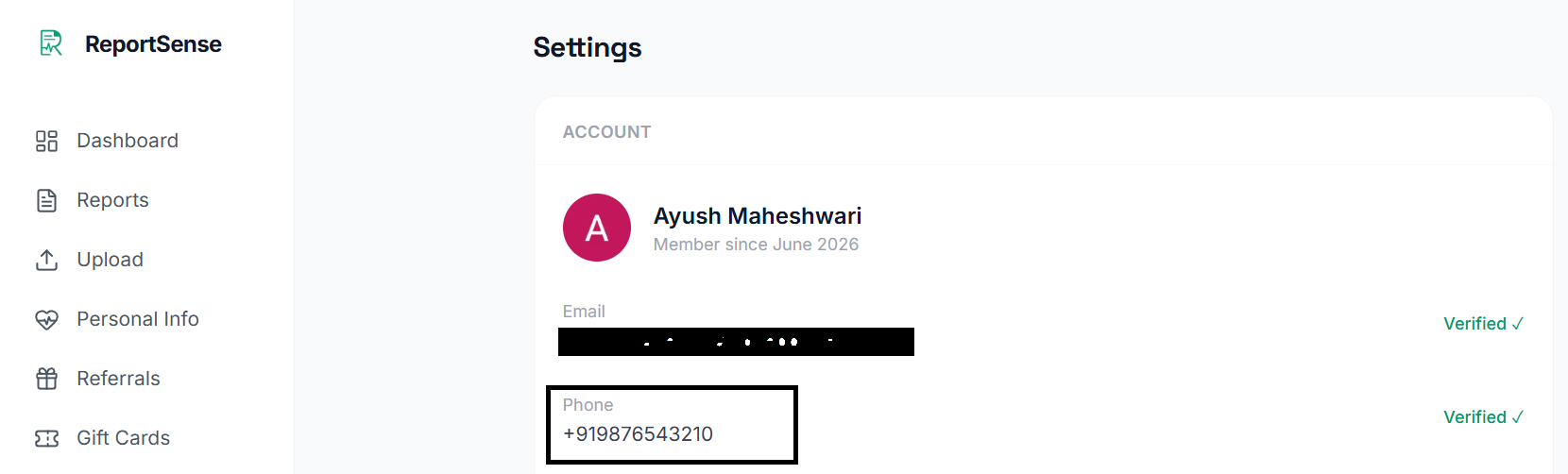
You can verify your phone number from the Settings screen. ReportSense sends a one-time password (OTP) by SMS, and once you enter it, your number is verified. It only takes a moment.

Verifying your phone number with an OTP on the ReportSense Settings screen

Why is phone verification important?

Verifying your phone number does a few helpful things. It keeps your account secure, it lets us reach you by SMS for important updates such as payment and subscription information, and it is one of the two steps that unlock the referral program (the other is uploading your first report). It only takes a moment to do.

Billing & Plans

9

What is included in the free plan?

The Free plan lets you analyse up to 2 reports every month for 1 profile, at no cost and with no credit card. You get the same plain-language explanations, severity signals, insights, and doctor questions as the paid plans. It is a great way to try ReportSense and see the value before deciding to upgrade.

What is the difference between Personal and Family plans?

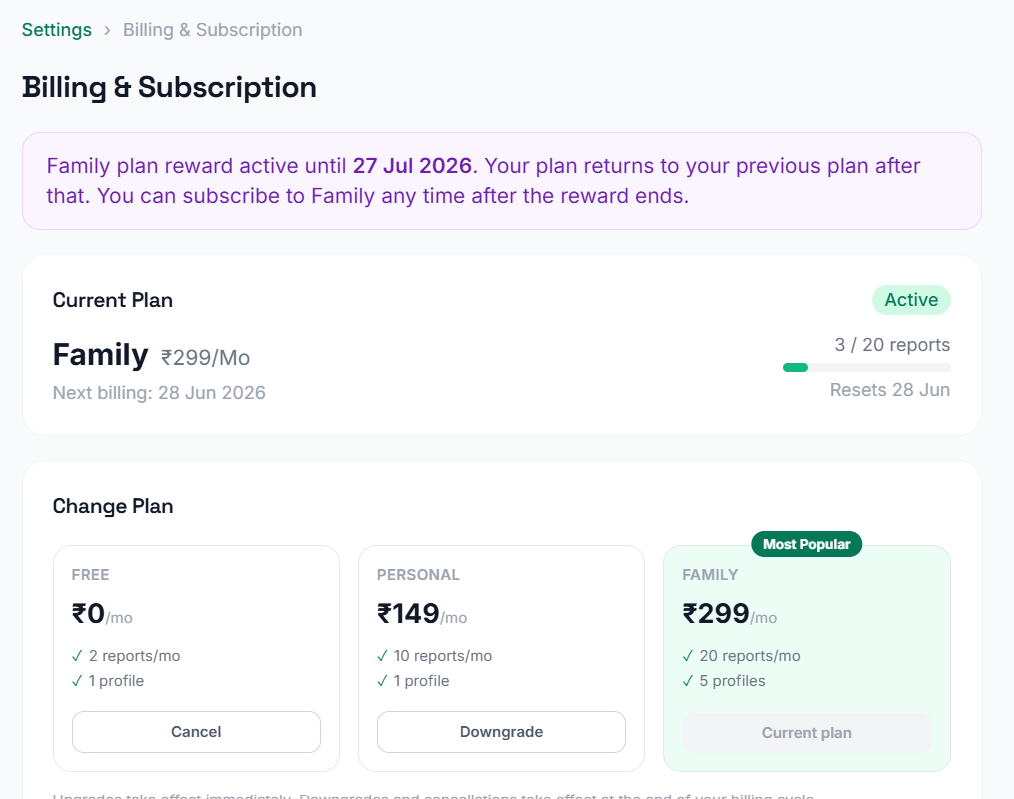
Both paid plans give you more reports each month than the Free plan. As a launch offer, Personal costs Rs 149 per month (regular price Rs 299) and includes 10 reports a month for 1 profile, ideal if you are tracking just your own health. Family costs Rs 299 per month (regular price Rs 699) and includes 20 reports a month across up to 5 profiles, so you can look after your whole family from one account.

The Free, Personal and Family plan cards on the ReportSense Billing screen

From where can I see my billing and subscription?

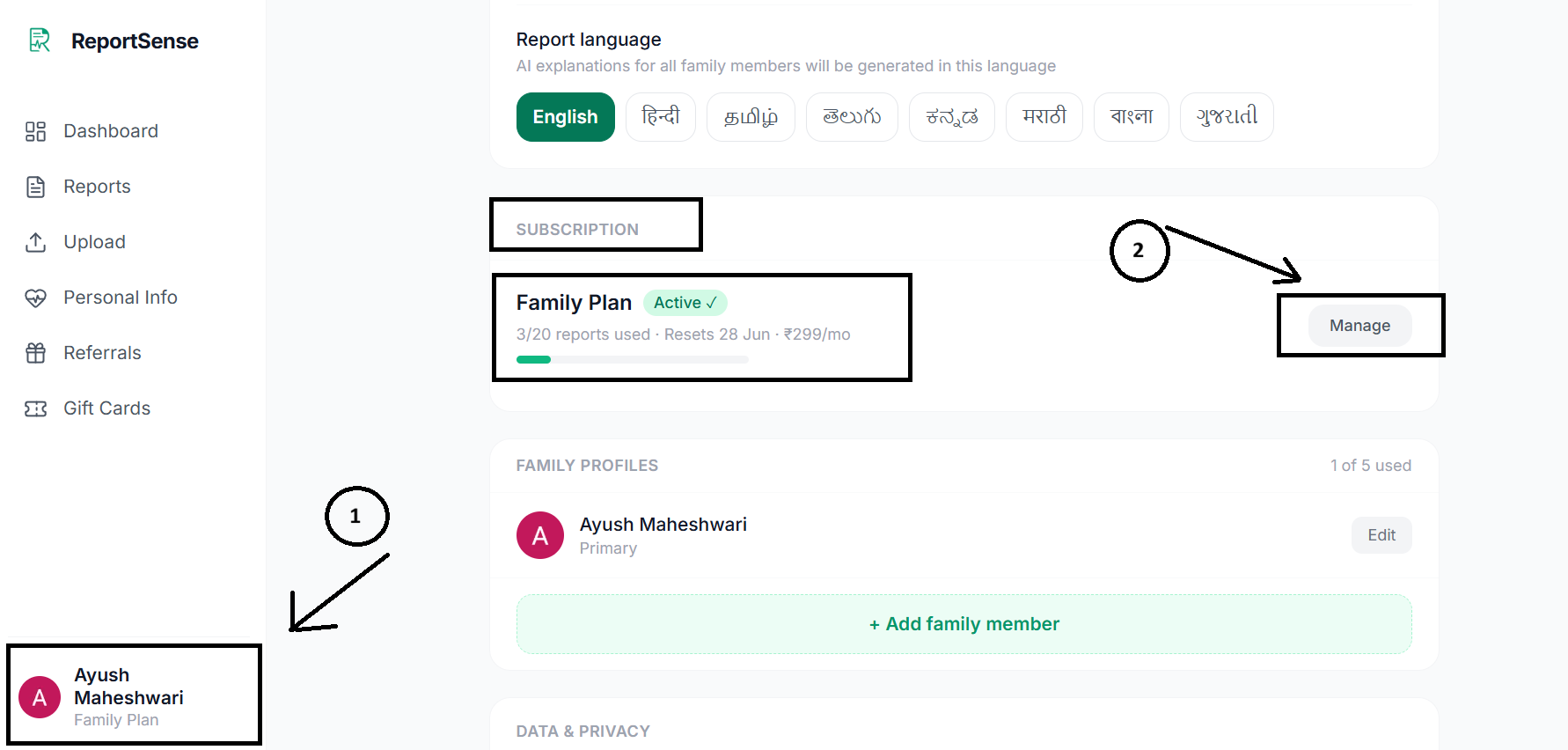
Everything about your plan lives on the Billing screen. There you can see your current plan, how many reports you have used this cycle, your next renewal date, and your full payment history. You can also upgrade, downgrade, or cancel from the same place.

The ReportSense Billing screen showing your current plan, usage this cycle, and renewal date

How does UPI AutoPay billing work?

Paid plans use UPI AutoPay, a secure recurring payment set up through Razorpay. When you subscribe, you approve a one-time AutoPay mandate in your UPI app, and after that your plan renews automatically each month without you having to pay manually. You stay in control and can cancel any time, and your payment details are handled securely by Razorpay, not stored by us.

How do I upgrade or downgrade my plan?

You can change your plan any time from the Billing screen. Upgrading from Personal to Family takes effect straight away, and the days you already paid for are carried over fairly so you never lose what you paid. Downgrading from Family to Personal takes effect at the end of your current billing cycle, so you keep your higher plan for the time you have already paid for.

When does a plan change take effect?

It depends on the direction of the change. An upgrade (Personal to Family) applies immediately, so you get the bigger plan right away. A downgrade (Family to Personal) or a cancellation applies at the end of your current billing cycle, so you keep your current benefits until the date you have already paid through.

When does my monthly report count reset?

Your monthly report count refreshes at the start of each new billing cycle, which is roughly every 30 days on your renewal date, not on the 1st of the calendar month. So if your cycle began on the 12th, your reports refresh around the 12th of the following month.

What happens if a payment fails?

There is no need to worry if a renewal payment does not go through the first time. ReportSense keeps your plan active during a short grace period of a few days and automatically retries the payment. If it still cannot be collected after that, your plan simply moves to the Free plan, and you can re-subscribe whenever you are ready. You will never be charged twice for the same cycle.

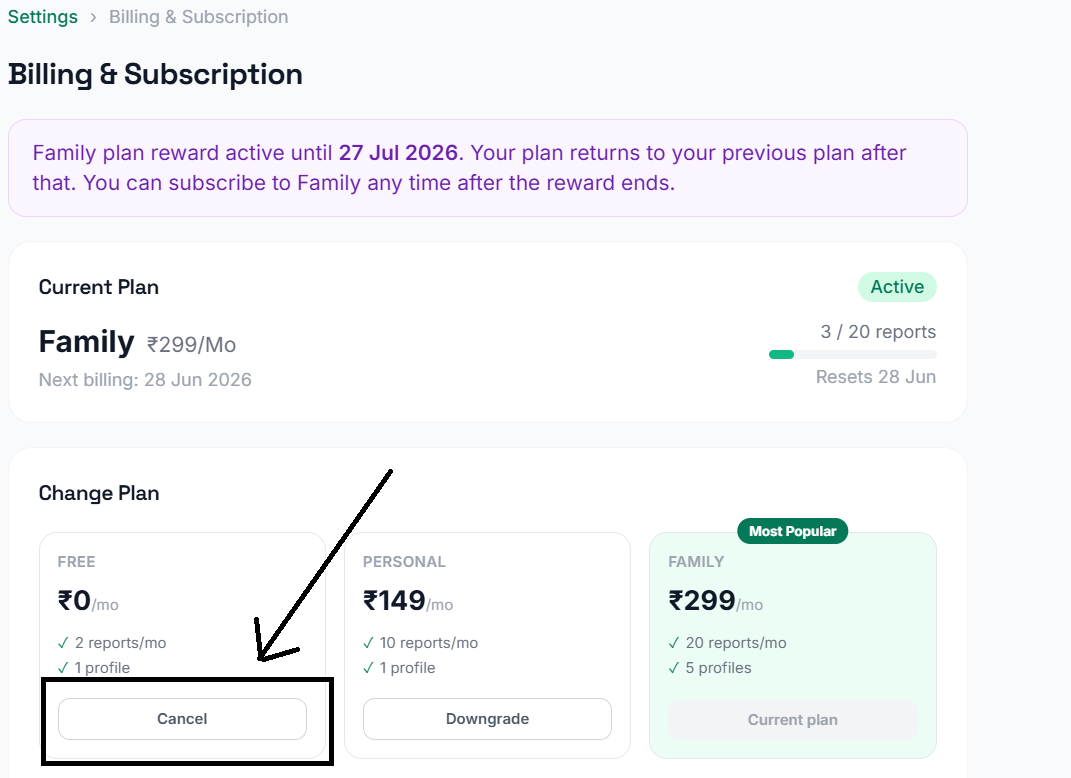
Can I cancel my subscription?

Yes, any time, with no cancellation fee. Just cancel from the Billing screen. Your paid benefits stay active until the end of the cycle you have already paid for, and then your account moves to the Free plan. If you change your mind before the cycle ends, you can undo the cancellation and continue as before.

Cancelling a subscription from the ReportSense Billing screen

Gift Cards, Coupons & Referrals

12

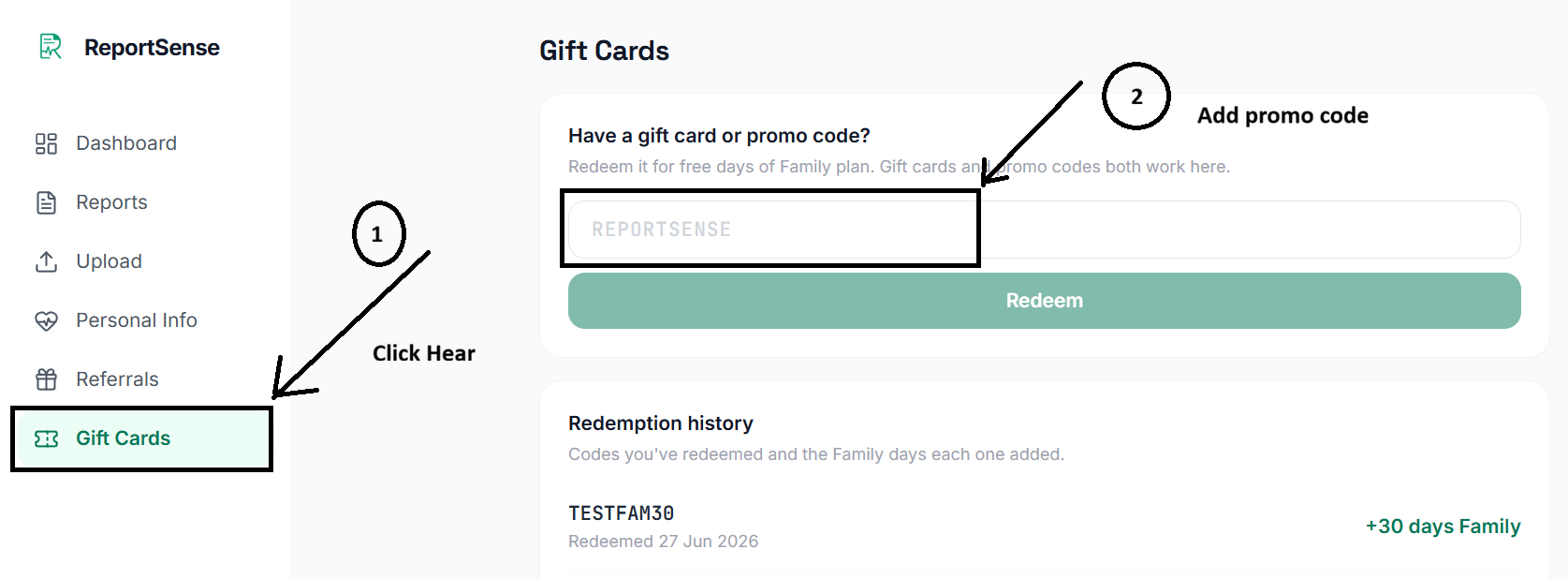
How do I redeem a gift card or coupon?

Go to the Gift Cards screen, enter your code, and apply it. Your reward is added to your account instantly, and you will see a little celebration when it lands. There is nothing else to do, your benefits start right away.

Redeeming a gift card or coupon code in ReportSense

What do I get when I redeem one?

Redeeming a valid gift card or coupon gives you a set number of days of free Family plan access, our top plan with 20 reports a month across up to 5 profiles. The exact number of days depends on the code. When the free period ends, your account simply returns to whatever plan you were on before.

Can I redeem multiple codes?

Yes. If you apply more than one code, the free days stack and run one after another, so you enjoy the full benefit of each. You will always be able to see when your current reward period ends.

What happens if I'm already on a paid plan and apply a coupon?

You will not lose anything you paid for. If you are already on a paid plan and apply a coupon, the free Family days are added on top, and the time you already paid for is preserved and simply continues afterwards. If you are on Personal, you enjoy Family-level access during the reward period, then return to Personal.

Can I change my plan while on a reward period?

While a reward period is running, plan changes (upgrades and downgrades) are paused so your reward runs cleanly to its end. You can still cancel if you wish, and the reward continues until it expires. Once the reward period ends, you are free to change plans again as usual.

How does the referral program work?

When you invite a friend with your referral code and they join, both of you earn 15 days of free Family plan access. Your friend enters your code, and the reward is granted once they verify their phone number and upload their first report. It is our way of saying thank you for spreading the word.

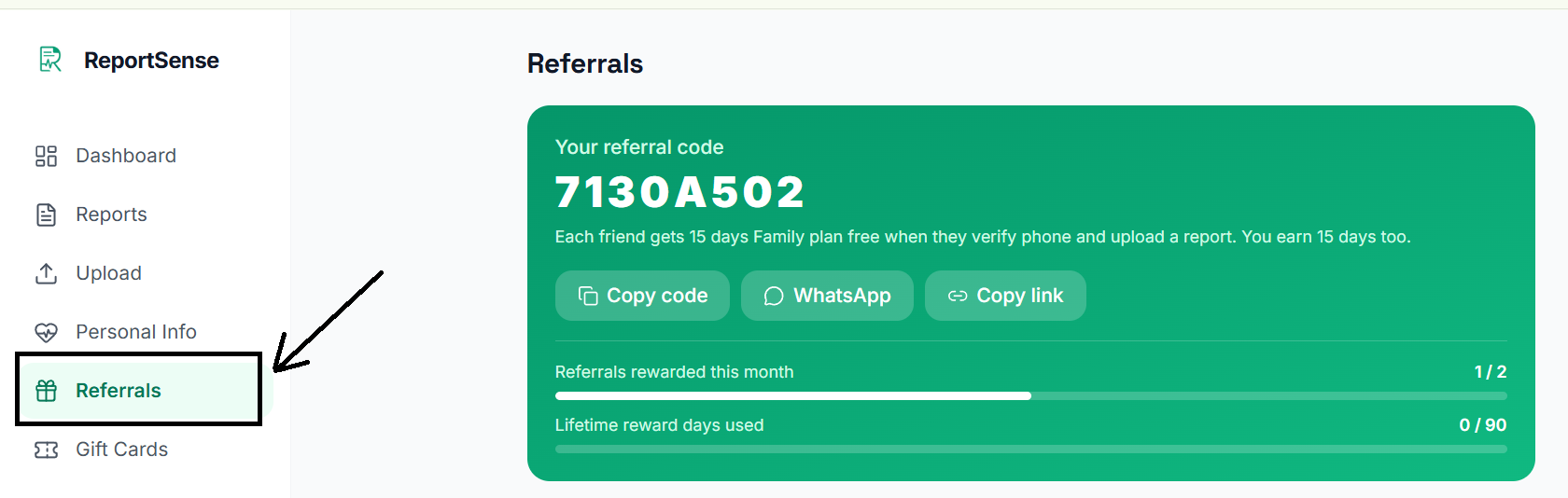
How do I share my referral code?

Once your referral code is unlocked, head to the Referrals screen where you can copy your code or share it directly on WhatsApp with one tap. Send it to friends and family, and you both earn free Family access when they get started.

Sharing your ReportSense referral code on WhatsApp

When does my referral code unlock?

Your referral code unlocks once you have done two quick things: verified your phone number and uploaded at least one report. This keeps the program fair and genuine. After that, your code is ready to share.

What reward do I get for a successful referral?

For every successful referral, both you and the friend you invited receive 15 days of free Family plan access. You can earn rewards for up to 2 friends each month, and up to 90 days of referral rewards in total over the life of your account. You can always track this on your Referrals screen.

When is a referral counted as successful?

A referral becomes successful when the friend you invited completes two steps after entering your code: they verify their phone number and upload their first report. At that point, the 15 days of free Family access are granted to both of you.

Why is my referral still pending even though the referred person verified their phone and uploaded a report?

A referral usually changes from pending to rewarded automatically once your friend has both verified their phone and uploaded a report on an active profile. If it is still pending, it is most often because the report was uploaded on a profile that was later removed, or because a monthly referral limit has been reached for that period. If everything looks right and it still has not updated, please reach out to us and we will sort it out.

From where can I get more coupons and gift cards?

We usually announce new coupons and gift cards on our social media at random times, so the best way to catch them is to follow us on LinkedIn and Instagram, where we are most active. Each coupon has a limited number of seats and is first-come, first-served, and the reward is a surprise, anywhere from 7 days of free Family access to a whopping 30 days. Each coupon also comes with a validity period, so be sure to redeem it before it expires. The referral program is always there too if you would like free Family days any time.

Privacy & Data Safety

8

How is my report more secure than ChatGPT or other AI chatbots?

When you paste your report into a general chatbot, you often lose track of where that data goes. ReportSense is different. It is built specifically for health reports, your data is stored securely in your private account, it is never used to train AI models, and you can permanently delete everything whenever you want. You also get structured, India-aware explanations and severity checks, not just a freeform chat reply.

Do you use my health data to train AI models?

No, never. Your lab reports and health information are used only to generate your explanations and run your account. They are not used to train any AI model, and they are not sold or shared for advertising. Your health data stays yours.

Who can see my lab reports?

Only you. Your reports and health information are tied to your private account and are not visible to other users. We treat your health data as confidential and access it only when strictly needed to operate or support the service.

How is my health data stored?

Your reports and results are stored securely in our database, and your original report PDFs are kept in protected, access-controlled storage. Payments are handled by Razorpay, so your card or UPI details are never stored by us. We follow sensible security practices to keep your information safe.

Does ReportSense share my data with anyone?

We do not sell your data or share it for advertising. We use a small number of trusted service providers to run the app, such as our cloud database, secure payment processing, and the AI that generates your explanations, and they process your data only to provide that service to you. Your data is never used to train AI models. You can read the full details in our Privacy Policy.

What does deleting my account do? Can I retrieve my data?

Deleting your account is permanent. It removes your profiles, reports, results, and health information, and your original report PDFs are erased from our storage too. Because the deletion is complete and final, your data cannot be retrieved afterwards, so please save anything you want to keep first. We retain only the minimal billing records the law requires us to.

How can I export all my data and reports?

A one-tap data export is coming soon. In the meantime, if you would like a copy of your data, you can contact us and we will help you. You can also delete all of your data at any time from Settings.

Is ReportSense compliant with Indian data protection laws (DPDP)?

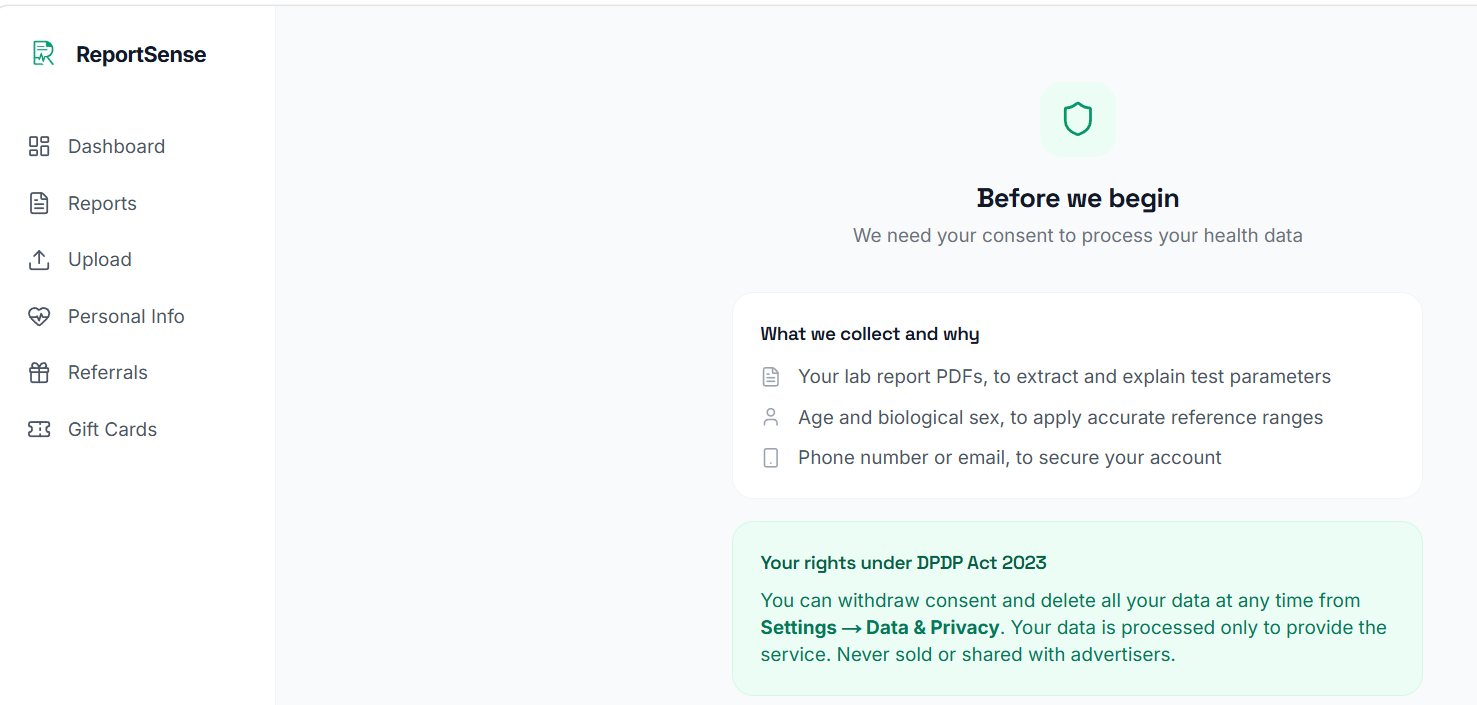
Yes. ReportSense is built to respect India's Digital Personal Data Protection (DPDP) Act, 2023. We ask for your clear consent before your first upload, we use your data only for the purposes you agreed to, and we give you the right to delete your data at any time from Settings. You stay in control of your information.

The DPDP consent screen ReportSense shows before your first upload

Medical disclaimer: ReportSense provides educational information only, not medical advice. Always consult a qualified doctor to interpret your results and decide on next steps.
Ready to see it on your own report?

Every value explained in plain language, in under two minutes.

Let's try ReportSense